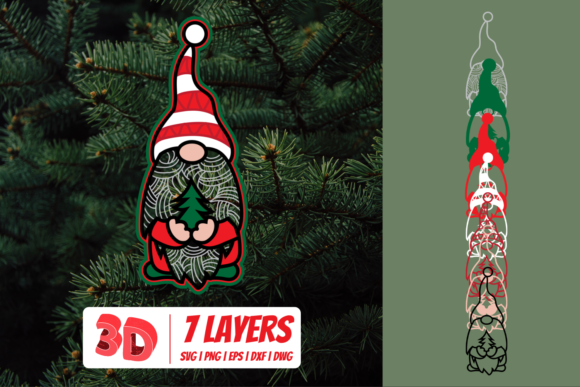
3D Christmas Gnome
The holiday season brings a unique blend of creativity and nostalgia, and few symbols capture that spirit quite like the 3D Christmas Gnome. Unlike flat decorations or generic store-bought ornaments, a handmade 3D version offers depth, texture, and a personal touch that instantly elevates any festive display. Whether you are crafting for a family gathering, designing products for your small business, or simply looking to add a whimsical element to your home decor, this project stands out as a favorite among makers.
However, the path from a digital file to a finished physical gnome can be fraught with technical hurdles if you aren't prepared. Many creators rush into cutting files without verifying software compatibility or material suitability, leading to wasted time, expensive materials, and frustrated expectations. The difference between a charming, professional-looking decoration and a misshapen mess often comes down to choosing the right file formats and understanding how to prepare them correctly.
Navigating File Formats: Why One Size Does Not Fit All
When you download a 3D Christmas Gnome design, you are rarely getting just one file. You are typically receiving a zipped folder containing multiple formats, each serving a specific purpose in the creation process. Confusion often arises when users try to force a format to work in software that doesn't support it, resulting in distorted images or failed cuts.
The SVG (Scalable Vector Graphics) file is the gold standard for digital cutting machines. It contains the mathematical paths needed by software like Cricut Design Space, Silhouette Studio Designer Edition, Make The Cut (MTC), Sure Cuts A Lot (SCAL), and Brother ScanNCut's "Canvas" software. If you own a modern cutting machine, this is your primary file. However, a common mistake is attempting to open an SVG in basic image viewers or older versions of cutting software that haven't been updated. This can lead to missing layers or cut lines that don't appear, causing you to think the file is broken when it actually just needs the correct program.
For those using Silhouette Basic Edition, the situation is different. While the free version of Silhouette Studio is popular, it cannot open SVG files directly. Users who purchase a premium design expecting to use it immediately on the free software often face disappointment. The solution lies in the included DXF (Drawing Exchange Format) file. This universal vector format bridges the gap, allowing Basic Edition users to import their 3D Christmas Gnome design without needing to upgrade their software suite. Always check your software version before starting; knowing which file to open saves hours of troubleshooting.
Designers working in professional environments often rely on EPS (Encapsulated PostScript) files. These are essential for users of CorelDraw, Inkscape, and Adobe Illustrator. An EPS file allows for high-quality editing, resizing, and color manipulation without losing resolution. If you plan to integrate the gnome design into a larger marketing campaign, a logo, or a complex layout, the EPS format ensures crisp edges and scalability. Skipping this step and trying to edit a rasterized image can result in pixelated prints that look unprofessional.
Finally, the PNG file serves a different need entirely. With a transparent background and 300 DPI resolution, this photo file is perfect for digital printing, social media graphics, or transferring designs onto fabric via heat press. Beginners sometimes confuse PNGs with cut files, trying to load them into a cutter. Remember, PNGs are for viewing and printing, not for cutting paths. Understanding this distinction prevents the frustration of loading a picture into a blade cutter and wondering why nothing happens.
Avoiding Common Pitfalls in Material Selection
Even with the perfect file, the final quality of your 3D Christmas Gnome depends heavily on the materials you choose. A frequent oversight is selecting paper or cardstock that is too thin to hold the 3D structure. Because this design relies on layering and folding to create depth, flimsy material will cause the gnome to collapse or lose its shape once assembled. Conversely, using material that is too thick can make the intricate folds difficult to score and crease accurately, leading to uneven seams.
Another critical error involves ignoring the scale of the design relative to your project. Some creators assume that because a file is vector-based, it can be infinitely large without consequence. While vectors do scale well, the complexity of a 3D assembly increases with size. If you decide to make a giant wall decoration, you must account for the number of layers and the structural integrity required. Without adjusting the build strategy, a large gnome may become top-heavy and unstable.
Color selection also plays a pivotal role. The original design likely features traditional reds, greens, and whites. However, applying these colors to dark or textured materials can obscure details. For a polished look, ensure your base material provides enough contrast for the layered elements to pop. If you are using a printer to create the layers, always run a test print on scrap paper first to verify that the ink coverage and alignment are correct before committing to your final stock.
Preparing for Success Before You Start Cutting
To ensure your 3D Christmas Gnome project is a success, take a moment to audit your setup. First, confirm that your cutting machine's blade is sharp and calibrated for your specific material thickness. Dull blades will tear delicate layers, ruining the clean lines necessary for a seamless assembly. Second, double-check your software settings. Ensure that the "Mirror Image" option is set correctly if you are printing on transfer paper, and verify that the cut pressure matches the material density.
If you are a beginner, resist the urge to skip the practice run. Using the same high-quality material for your first attempt is a recipe for waste. Instead, use cardstock or scrap paper to assemble a prototype. This allows you to identify where the folds might be tricky and gives you a chance to refine your scoring technique. Once the prototype holds together perfectly, you can confidently move to your premium materials.
By paying attention to these details—choosing the right file format for your software, selecting appropriate materials, and testing your workflow—you avoid the most common pitfalls associated with DIY projects. The result is a beautiful, durable 3D Christmas Gnome that looks as good as it feels to make. Whether you are creating a gift for a loved one or a product for your shop, taking the time to get the technical foundation right ensures that your creativity shines through without unnecessary obstacles.
Remember, the goal is to enjoy the process and create something lasting. With the right preparation and an understanding of how to utilize the included SVG, DXF, EPS, and PNG files, your next holiday craft can be nothing short of spectacular. Take a deep breath, organize your workspace, and let the magic of the season guide your hands as you bring this festive character to life.